Showing posts with label XML. Show all posts

How to Convert Multidimensional Array to XML File in PHP

On 12/11/2017 5 Comments so far

Hi, today we’ll see how to convert multidimensional array to xml file in php. XML, the EXtensible Markup Language is a good old data-exchange format and lost its popularity to JSON. But the sad truth is XML still exists and used to store and exchange data on the WEB. If you are one among the developers who has to deal with XML, then this tutorial is aimed at you. Converting an associative array or a complex multi-dimensional array no matter what, the php script I have given here will easily convert those arrays to xml file.

Converting PHP Multi-Dimensional Array to XML File

Here’s the breakdown of the steps we are going to implement for php array to xml conversion.

Step-1: Create a function array2XML() to convert array to xml: This function will continuously iterates through the given multi-dimensional array and add each (key, value) pairs as a separate xml node with the help of php’s SIMPLEXML class.

Step-2: Next define the php associative or multi-dimensional array to convert.

Step-3: Create a new instance of the simplexml class.

Step-4: Callback to the function array2XML() to convert the array (defined in step-2) to an xml object.

Step-5: Finally save the generated xml as a file.

PHP Code for Array to XML Conversion

<?php
// function to convert multi-dimensional array to xml
function array2XML($obj, $array)
{
    foreach ($array as $key => $value)
    {
        if(is_numeric($key))
            $key = 'item' . $key;

        if (is_array($value))
        {
            $node = $obj->addChild($key);
            array2XML($node, $value);
        }
        else
        {
            $obj->addChild($key, htmlspecialchars($value));
        }
    }
}

// define php multi-dimensional array
$my_array = array (
    '0' => array (
        'id' => 'XYZ100',
        'personal' => array (
            'name' =>'Ashton Cox',
            'gender' => 'Male',
            'age' => 32,
            'address' => array (
                 'street' => '7 24th Street',
                 'city' => 'New York',
                 'state' => 'NY',
                 'zipcode' => '10038'
             )
        ),
        'profile' => array (
            'position' => 'Team Lead',
            'department' => 'Software'
        )
    ),
    '1' => array (
        'id' => 'XYZ121',
        'personal' => array (
            'name' => 'Rhona Davidson',
            'gender' => 'Female',
            'age' => 40,
            'address' => array (
                 'street' => 'S2 115th Street',
                 'city' => 'New York',
                 'state' => 'NY',
                 'zipcode' => '10100'
             )
        ),
        'profile' => array (
            'position' => 'Integration Specialist',
            'department' => 'Operations'
        )
    )
);

// create new instance of simplexml
$xml = new SimpleXMLElement('<root/>');

// function callback
array2XML($xml, $my_array);

// save as xml file
echo (($xml->asXML('data.xml')) ? 'Your XML file has been generated successfully!' : 'Error generating XML file!');
?>

As you can see the array2XML() is a recursive function that pretty much parse through arrays of several depths. This will also work with associative arrays with numeric keys and store them as <item0>, <item1> as xml don’t allow numeric keyed nodes like <0>, <1>, <2>, ... and consider them as invalid.

The method addChild() will add an xml node to the object.

The statement new SimpleXMLElement('<root/>'); will create an xml object with the top node as <root></root>.

The line $xml->asXML('data.xml') will save the xml string to ‘data.xml’ file. Make sure to provide complete file path to save the file in different location.

Now run the above script and the xml file will be generated without any errors.

Here’s the xml file generated by the above php script.

<?xml version="1.0" ?> 
- <root>
    - <item0>
          <id>XYZ100</id> 
        - <personal>
              <name>Ashton Cox</name> 
              <gender>Male</gender> 
              <age>32</age> 
            - <address>
                  <street>7 24th Street</street> 
                  <city>New York</city> 
                  <state>NY</state> 
                  <zipcode>10038</zipcode> 
              </address>
          </personal>
        - <profile>
              <position>Team Lead</position> 
              <department>Software</department> 
          </profile>
      </item0>
    - <item1>
          <id>XYZ121</id> 
        - <personal>
              <name>Rhona Davidson</name> 
              <gender>Female</gender> 
              <age>40</age> 
            - <address>
                  <street>S2 115th Street</street> 
                  <city>New York</city> 
                  <state>NY</state> 
                  <zipcode>10100</zipcode> 
              </address>
          </personal>
        - <profile>
              <position>Integration Specialist</position> 
              <department>Operations</department> 
          </profile>
      </item1>
  </root>

Inserting XML String into Database

Wan’t to store xml data as a string in database? Then use this below code instead of the last statement in the php script.

$data = $xml->asXML();

Now the variable $data contains the array in the xml format and you can easily insert into database like you do normally.

Read Also:

And that was all about converting multi-dimensional array to xml in php. Alternatively if you want the reverse process, check this tutorial to Covert XML File to Array in PHP.
How to Convert XML File to Array in PHP

On 12/10/2017 Be the first to comment!

Hi! In this post let us see How to Convert XML File/String to Array in PHP. Its reverse process of converting array to xml has been already discussed and you can find that tutorial here. It’s a known fact that XML is used to store and exchange information among web services and still some of them provide their API response in xml format. In such case you have to parse those xml files and extract data to process it. PHP provides a handy library called SIMPLEXML to handle xml data. Here I’ll show you how easy it is to use simplexml library to parse and covert the xml file to php array.

convert xml to associative array in php

Converting XML File to PHP Array

Converting xml data into array is simpler than you think and we are going to take advantage of simplexml lib and json functions to complete the task with minimal code. Just take this below xml file as an example for our purpose.

Data.xml

<?xml version="1.0" ?> 
- <root>
    - <item0>
          <id>XYZ100</id> 
        - <personal>
              <name>Ashton Cox</name> 
              <gender>Male</gender> 
              <age>32</age> 
            - <address>
                  <street>7 24th Street</street> 
                  <city>New York</city> 
                  <state>NY</state> 
                  <zipcode>10038</zipcode> 
              </address>
          </personal>
        - <profile>
              <position>Team Lead</position> 
              <department>Software</department> 
          </profile>
      </item0>
    - <item1>
          <id>XYZ121</id> 
        - <personal>
              <name>Rhona Davidson</name> 
              <gender>Female</gender> 
              <age>40</age> 
            - <address>
                  <street>S2 115th Street</street> 
                  <city>New York</city> 
                  <state>NY</state> 
                  <zipcode>10100</zipcode> 
              </address>
          </personal>
        - <profile>
              <position>Integration Specialist</position> 
              <department>Operations</department> 
          </profile>
      </item1>
  </root>

Here is the php script to convert the above xml file to associative array.

<?php
// function to convert xml to php array
function xml2Array($filename)
{
    $xml = simplexml_load_file($filename, "SimpleXMLElement", LIBXML_NOCDATA);
    $json = json_encode($xml);
    return json_decode($json,TRUE);
}

// function callback
$arr = xml2Array("Data.xml");
print_r($arr);

// produces output:

// Array ( [item0] => Array ( [id] => XYZ100 [personal] => Array ( [name] => Ashton Cox [gender] => Male [age] => 32 [address] => Array ( [street] => 7 24th Street [city] => New York [state] => NY [zipcode] => 10038 ) ) [profile] => Array ( [position] => Team Lead [department] => Software ) ) [item1] => Array ( [id] => XYZ121 [personal] => Array ( [name] => Rhona Davidson [gender] => Female [age] => 40 [address] => Array ( [street] => S2 115th Street [city] => New York [state] => NY [zipcode] => 10100 ) ) [profile] => Array ( [position] => Integration Specialist [department] => Operations ) ) ) 
?>

We have written a php function xml2Array() that takes up the xml filename as argument and convert it into array.

The method simplexml_load_file($filename, "SimpleXMLElement", LIBXML_NOCDATA) converts the given XML file into a SimpleXMLElement object. Its second param SimpleXMLElement specifies the class name of the new object created. And the third param LIBXML_NOCDATA is a constant that tells to merge CDATA as text nodes. Learn more about the method here.

And the method json_encode($xmlstring) returns the JSON representation of the given object.

Finally json_decode($json, TRUE) decodes the given JSON string into an array or object. Providing the second param TRUE tells it to return an associative array.

Converting XML String to PHP Array

Alternatively if you have xml data as string and wish to convert to array, then you have to use this statement instead of loading from the file.

$xml = simplexml_load_string($xmlstring, "SimpleXMLElement", LIBXML_NOCDATA);

This converts a well-formed xml string to a simplexmlelement object. You have to change only this line and the rest of the code remains the same.

Read Also:

Thus with the help of this php script you can easily convert xml file or string to an array.

Read Website / Blog RSS Feed and Display in PHP

On 11/20/2017 Be the first to comment!

Hi, in this post we will see how to read rss feed of a blog, website and display them using php. In case you don't know, RSS stands for 'Really Simple Syndication'. It is a type of web feed used by websites, blogs and other means of online publishing to syndicate the content to its readers. The contents of the rss feed is in xml format. So, to read the feed, you must parse the xml file from the feed url and display the parts of the feed contents one by one in human readable format.

PHP comes with native XML support, so you don't need any third-party tools for doing this. There is also more than one way to read rss feed, one is to use Simple XML Parser and the other is the DOMDocument library which I will show you later in this tutorial.

php read and display rss feed of blog

How to Read RSS Feed in PHP using Simple XML Parser?

Simple XML Parser in PHP supports a native function called simplexml_load_file() to read xml file. This function interprets the xml file into an object array. Below is the small php function to read the rss feed from the given feed url.

It gets the feed contents from an rss url, loops through it and returns the property of each feed item into an array.

<?php
function read_rss_feed($rss_url) {
    $rss = simplexml_load_file($rss_url);
    $rss_feed = array();
    foreach ($rss->channel->item as $item) {
        $node = array (
            'title' => $item->title,
            'link' => $item->link,
            'pubDate' => $item->pubDate,
            'description' => implode(' ', array_slice(explode(' ', $item->description), 0, 40))
        );
        array_push($rss_feed, $node);
    }
    return $rss_feed;
}
?>

Displaying RSS Feed:

Now you have to call the above read_rss_feed() function and display the feed lists wherever you want.

<?php
// read feed
$feed = read_rss_feed('http://wordpress.org/news/feed/');

// set header
header('Content-Type: text/html; charset=utf-8');

echo '<div style="width:60%; margin:0 auto;">';
echo '<h1>RSS Feed List</h1>';

// display rss feed
foreach($feed as $item) {
    echo '<h4><a href="'. $item['link'] .'">' . $item['title'] . '</a></h4>';
    echo '<p>' . $item['pubDate'] . '</p>';
    echo '<p>' . $item['description'] . '</p>';
}
echo '</div>';
?>

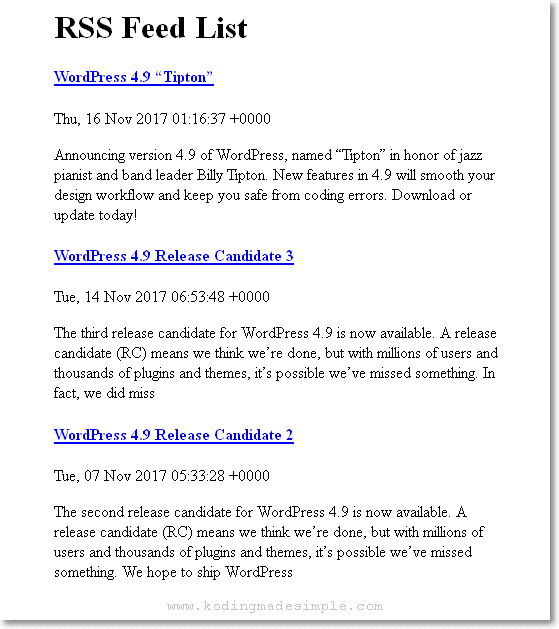
Running this script will produce an output like this,

php display rss feed from url

Using DOMDocument Method:

As I said earlier, there is another way to read the rss feeds and that is to use the DOM extension php library. It is a DOM parser which makes it easier for you to read the xml data. The following code shows how to use DOMDocument to work with the rss feed from a url.

<?php
$rss = new DOMDocument();
$rss->load('http://wordpress.org/news/feed/');

// set header
header('Content-Type: text/html; charset=utf-8');

echo '<div style="width:60%; margin:0 auto;">';
echo '<h1>RSS Feed List</h1>';

foreach ($rss->getElementsByTagName('item') as $item) {
    echo '<h4><a href="'. $item->getElementsByTagName('link')->item(0)->nodeValue .'">' . $item->getElementsByTagName('title')->item(0)->nodeValue . '</a></h4>';
    echo '<p>' . $item->getElementsByTagName('pubDate')->item(0)->nodeValue . '</p>';
    echo '<p>' . $item->getElementsByTagName('description')->item(0)->nodeValue . '</p>';
}
echo '</div>';
?>

The above code creates a DOM object and loads the rss feed from a url, then loops through the DOM node one by one to extract the pieces of the feed contents and display it in a readable format.

Also Read:

That explains about reading rss feeds from websites/blogs using php. You can use the native DOM extension or the Simple XML parser to parse xml data and list it. I hope you like this tutorial. If you find it useful, please don't forget to share it in your circle.

Contact Form

Name

Email *

Message *